
SignNow Review
TL;DR – SignNow lets you add unlimited users on every paid plan — no extra seat fees, unlike many competitors.
Drowning in PDFs, chasing signatures, manually reminding someone to sign and dealing with slow clients?… You already know the pain.
SignNow removes all that friction. Stop Wasting Hours on Paperwork.
SignNow fixes it instantly:
➡️ Legally-binding signatures in minutes — from any device
➡️ Automate every step — reminders, routing, approvals
➡️ Drag-and-drop fillable forms — no developer needed
➡️ Enterprise security: HIPAA + audit trails
➡️ Smart integrations that auto-fill your data
➡️ Works seamlessly with all your existing tools
If you’re tired of slow paperwork, SignNow is the fastest way to close Contracts
In this post, I’m sharing my honest SignNow Review. It is the best electronic signature software, document management and contract management software I’ve tested.
I shared my experience with this SignNow eSignature platform, so you don’t have to waste time and money choosing.
Let’s go.
You can explore SignNow here
Disclaimer: This post has affiliate links at no cost to you.
SignNow Review
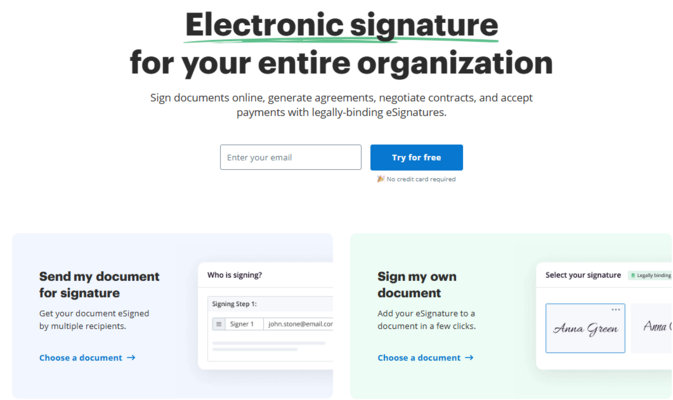
What Is SignNow & Why SignNow?
SignNow might look like “just another e-signature tool”… but once you dig in, you realise it’s actually a powerful workflow + contract automation system built around documents.
It’s a cloud-based eSignature platform from the airSlate product suite that lets you;
- sign, send, and manage documents from any device.
- you get templates, drag-and-drop fields, real-time tracking, and integrations with your favourite business app
- make onboarding, contracts, and approvals faster, smoother, and 100% paperless.
Now, let’s understand why SignNow?
If you’re tired of juggling PDFs, chasing signatures, and watching deals drag on for no reason… I’ve been there. Working with clients across time zones made contract management a daily headache, and I needed something that just worked.
That’s when I discovered SignNow.
I tested it inside real workflows, so you don’t waste time or money trying every tool on the market. And if you’re wondering, “Is SignNow worth it? Is it secure? Will it work for my business?” — This breakdown will answer all of it.
So in my opinion, AirSlate SignNow is perfect if:
- You want fast and legally binding eSignatures
- Your team needs automation (but not overly complex tools)
- You’re tired of paying $$$ for contract workflows
- You want something simple enough for clients to use without tutorials
You can explore SignNow here.
The biggest reason I gave it a shot?
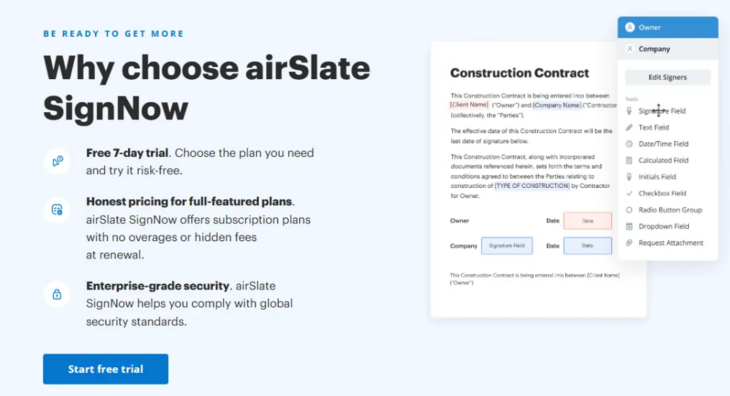
Isn’t it the best eSignature platform?
Now, let me share my experience.
My Experience
SignNow allows you to sign documents wherever you are, on the device that suits you like
- Desktop web browsers (Safari, Google Chrome, Microsoft Edge, and more)
- Mobile web browsers (Safari, Chrome, etc.)
- SignNow mobile app for iOS and Android (phones and tablets)
What I Love 💌
The key thing i liked about SignNow is, it offers Unlimited users on all plans — no per-seat charges. A major advantage over most competitors.
1. Set-up took me 6 minutes — Literally: I’m not kidding. Based on my research, it is fast. You can create an account, upload the first document, drag signature fields, and send it — all in a few minutes.
2. Super clean UI. Zero learning curve: If you want to try the setup yourself, explore SignNow’s free trial
3. Templates that save time: If you deal with recurring docs: contracts, proposals, NDAs… Templates are magical. No more editing the same Word file 47 times. Create once → reused forever.
4. Bulk sending is wildly efficient: You can send 30+ onboarding agreements to clients in one shot. Each one will get a customised version. Isn’t it zero manual work? And do you know, this is usually available only in the expensive “enterprise” tiers of other tools. SignNow gives it to you at a very reasonable price.
5. Conditional logic: What if I tell you, based on a condition trigger, you can show the user a different field? You can use this for multi-step agreements, and it makes workflows ultra-smooth.
e.g. if the user selects X → show this field. Isn’t it magic?
The best part, you don’t need any integration or plugin for this, SignNow has it built in. (Link)
6. Mobile experience deserves an award: Clients could sign right from their phone without:
❌ Creating an account
❌ Downloading an app
❌ Clicking 400 pop-ups
They open the link → sign → done. Simple. Elegant.
7. API for Developers (Surprisingly strong): If you’re a developer or working with one or want to integrate SignNow with your existing software, then the SignNow API is for you.
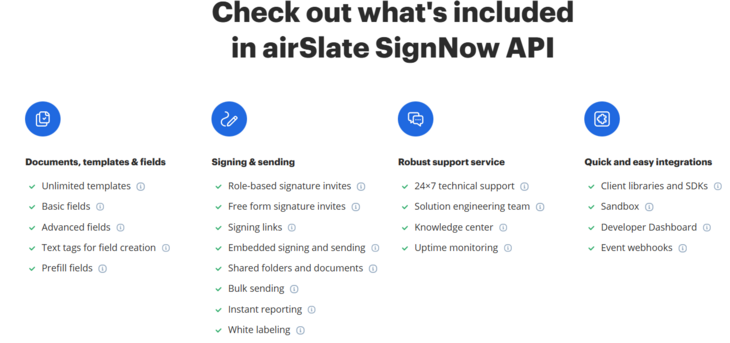
SignNow has a strong API for:
- Automated documents
- Embedded signing
- Custom workflows
- CRM/website integrations
Based on my research and other users experience, SignNow API is very stable and fast.
What is SignNow eSignature Process?
If you’ve been asked to sign a document electronically, you can create an eSignature and customise it on virtually any device with signNow.
Thanks to the intuitive Signature Wizard, it only takes a few seconds to create a unique signature: type, draw, or upload a photo of your handwritten signature. Save the one you like most and reuse it later as many times as you need.
How to Sign a Document with SignNow
Here is how SignNow works
Step 1: To use SignNow, sign up here and then start a session.
Once you get a document for signing, open the invite link on your selected device. You’ll see one of two welcome screens (Depending on the sender’s organisation settings)
- If Electronic Consent is disabled, you’ll see a simple welcome pop-up with language and policy info.
- If it’s enabled, you’ll be asked to provide e-signature consent, which you can change at any time.
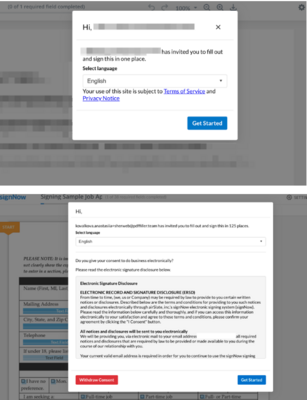
It asks to confirm language and consent. Click Get Started to begin the signing session
Step 2: Navigate & Complete Document Fields
Filling out documents in SignNow is honestly smooth. You can type, tap, or draw your signature, and the Guide Me feature walks you through every required field so you don’t miss anything.
I usually just hit Tab on desktop or use the arrows on mobile to move through fields. Required fields are bold, optional ones are lighter — super easy to follow.
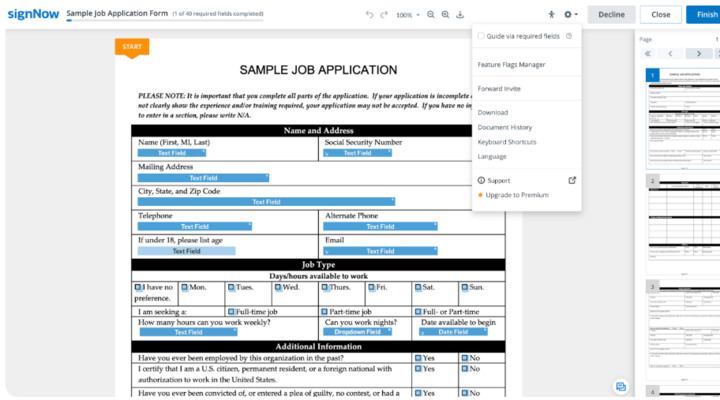
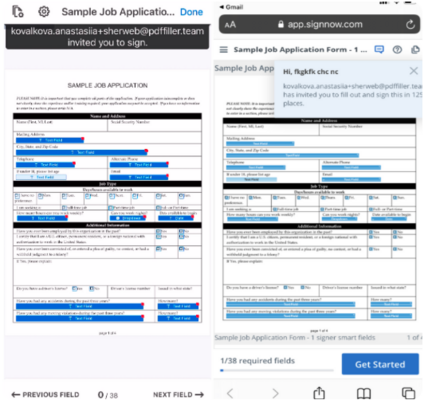
If you skip a field, just click the orange arrow to restart the guide.
You can even tweak the Guide Me settings to include optional fields if you want a full walkthrough. Once everything’s filled in, hit Finish in the top-right to submit your signed document.
SignNow Features
Not only can you collect signatures online with SignNow, but you can also do many things with it.
Here are some key features of SignNow;
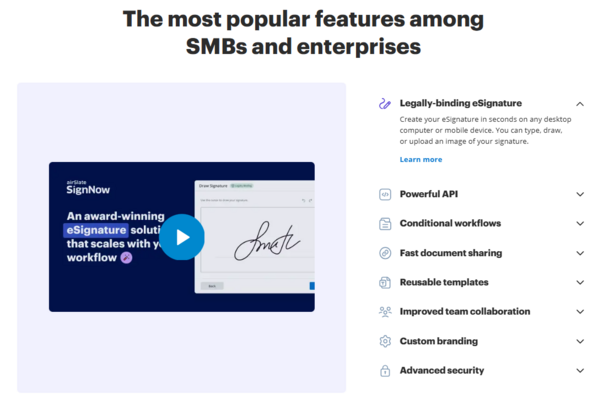
⭐ What You Actually Get
SignNow Pricing
How much does SignNow cost?
Here’s the part many are curious about: Is SignNow actually affordable?
And my answer is, YES, it is. It’s one of the best value-for-money eSignature tool than competitors.
SignNow gives you unlimited users on every plan, which saves you money compared to tools that charge per seat.
SingNow pricing plans have two types;
- eSignature SignNow Pricing Plans with 4 tiers
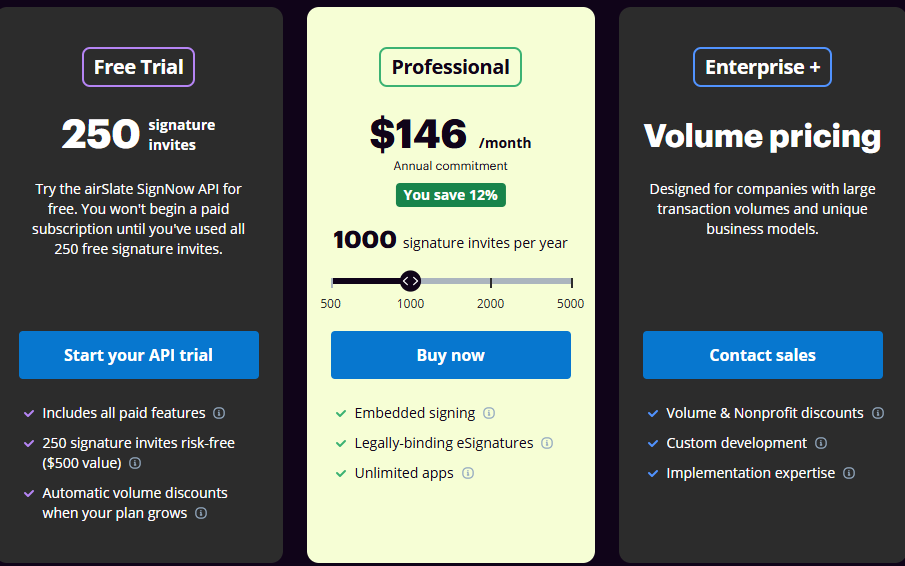
- SignNow API Pricing Plan
Let me show you in SignNow eSignature pricing in detail.
| Plan | Best For | Notes |
|---|---|---|
| Business | Freelancers & small teams | Templates + analytics |
| Business Premium | Growing teams | Bulk sending + branding |
| Enterprise | Large businesses | Advanced automation + SSO |
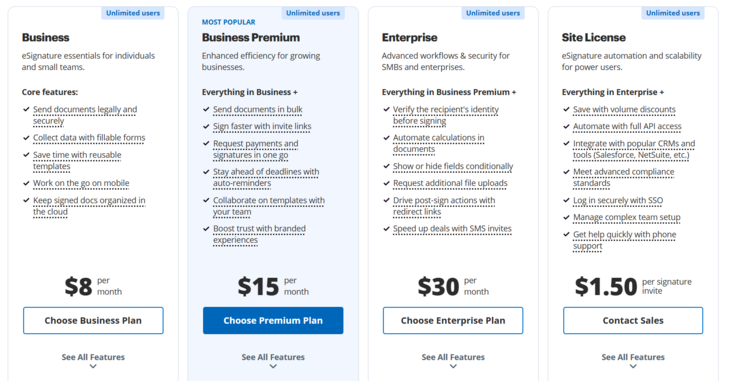
| SignNow Site License | Small businesses that intend to use a user-based eSignature solution | Costs are tied to the number of signature requests sent rather than user-based. The plan has an unlimited number of seats |
And pricing is as follows:
Whereas SignNow API Pricing plans are as follows:
Here is what you get with SignNow API
So in terms of pricing, SignNow is way better than competitors.
Who Is SignNow Best For?
SignNow Pros & Cons
Pros
Cons
FAQs About SignNow
Is SignNow safe and legally binding?
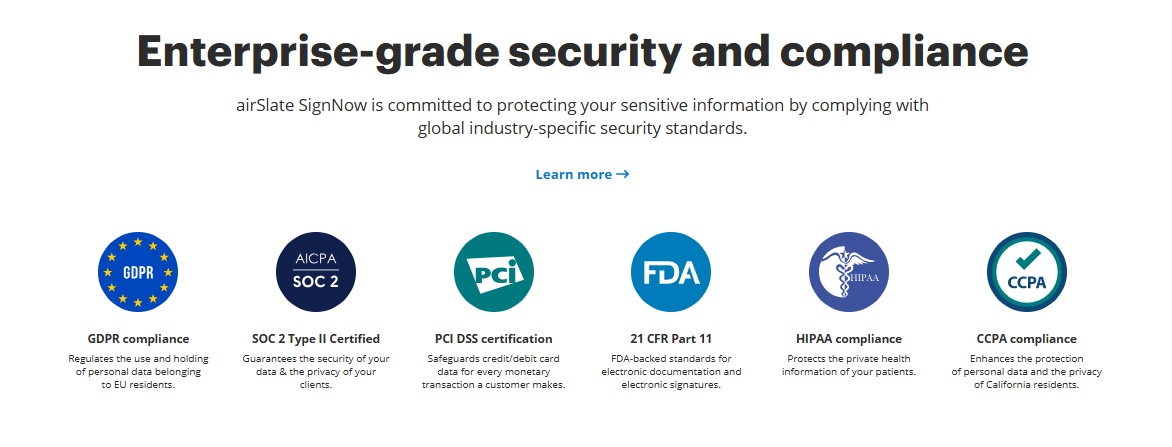
Yes. It follows all standard security protocols like ESIGN, UETA, GDPR, and SOC2. You can try SignNow’s free trial here →
Is SignNow better than DocuSign?
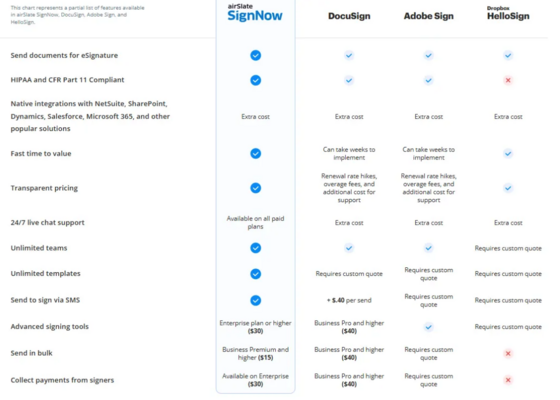
In my opinion, if you want affordability, speed, easy workflows & budget option, then SignNow is far better than DocuSign = YES. If you need extremely deep enterprise features = DocuSign wins.
Does SignNow integrate with Google, Salesforce, or Zapier?
Yes, SignNow integration is solid with multiple platforms. Other than this, if you want to add SignNow features in your workflow or software, you need to use get SignNow API
Is there a free trial?
Yes, SignNow offers a 7-Day Trial so you can test the features before you choose to upgrade. Get a 7-day trial here.
Is SignNow legally binding?
Yes, SignNow eSignatures are legally binds and adhere to many countries’ laws like ESIGN Act and eIADS. Other than that, SingNow provide security measures to protect sensitive data, with solutions like SOC 2, HIPAA, and GDPR. The best part I like is that it provides an audit trail means you can track records of action taken on a document, and the associated IP address.
What is the signature limit for SignNow?
SignNow eSignature limit is 100 signature invites per year per user on standard and business pro plans. You can buy additional credits after crossing this limit.
Is Airslate SignNow legit?
Yes, it is. airSlate SignNow is a leading eSignature solution for business. All the electronic signatures signed via SignNow are bound under laws like the ESIGN Act and eIADS.
Can I send a reminder to sign a document in signNow?
Yes, you can set a reminder. To set a reminder in SignNow, after editing the form, when it’s time to add signers, click Advanced Options –> Set Reminders section –> Set no. of days you want the recipient to receive the reminder in their email.
How to send a Bulk Invite in SignNow
To use the signNow Bulk Invite feature, you need an Excel spreadsheet with a list of signer emails saved in SVC format. Then find the bulk send feature in the More menu. Next, all listed contacts will receive a unique link to sign the document. That’s easy.
Bottom Line: SignNow Review
If you want a tool that is:
✔ Affordable
✔ Fast
✔ Easy to use
✔ Great for small & mid-sized teams
✔ Great at automation
✔ Loved by both senders and signers
Then, in my opinion, SignNow is absolutely worth it.
I’ve tested DocuSign, Adobe Sign, PandaDoc, and HelloSign — but for the price + features + simplicity, SignNow hits the sweet spot.
